Most automation platforms promise to replace your engineers. n8n is different — it's a tool your engineers actually want to use, and founders can understand without a CS degree.
We've been building production automation workflows with n8n across client projects for the past year. Here's what we've learned about when it shines, how to deploy it at scale, and where it hits its limits.
What n8n actually is
n8n is an open-source workflow automation platform — similar in concept to Zapier or Make, but self-hostable, code-friendly, and built for teams that need more than drag-and-drop simplicity. You connect nodes visually, but you can drop into JavaScript at any point. That hybrid is what makes it genuinely useful for technical teams.
The self-hosting option matters more than it sounds. For workflows touching customer data, financial records, or anything under compliance requirements, running n8n on your own infrastructure keeps data in your control. No third-party SaaS in the middle of your sensitive pipelines.
Where we reach for n8n
🔁 Internal operations automation
Lead routing, CRM updates, invoice generation, Slack notifications triggered by database events. Workflows that previously needed a custom microservice now take 30 minutes to build.
📨 Event-driven pipelines
Webhook receivers that fan out to multiple services — a new signup triggers onboarding emails, a CRM record, a Slack alert, and a reporting row, all in one workflow.
🤖 AI-augmented workflows
The built-in LLM nodes let you embed GPT-4o or Claude calls directly into workflows — no custom code required.
🔗 Third-party integration glue
Connecting services that don't have native integrations. n8n has 400+ built-in connectors, and the HTTP Request node handles anything that doesn't.
Building AI workflows in n8n
n8n's AI nodes have matured significantly. You can now build surprisingly capable AI pipelines without writing a line of Python. Here are the patterns we use most in production:
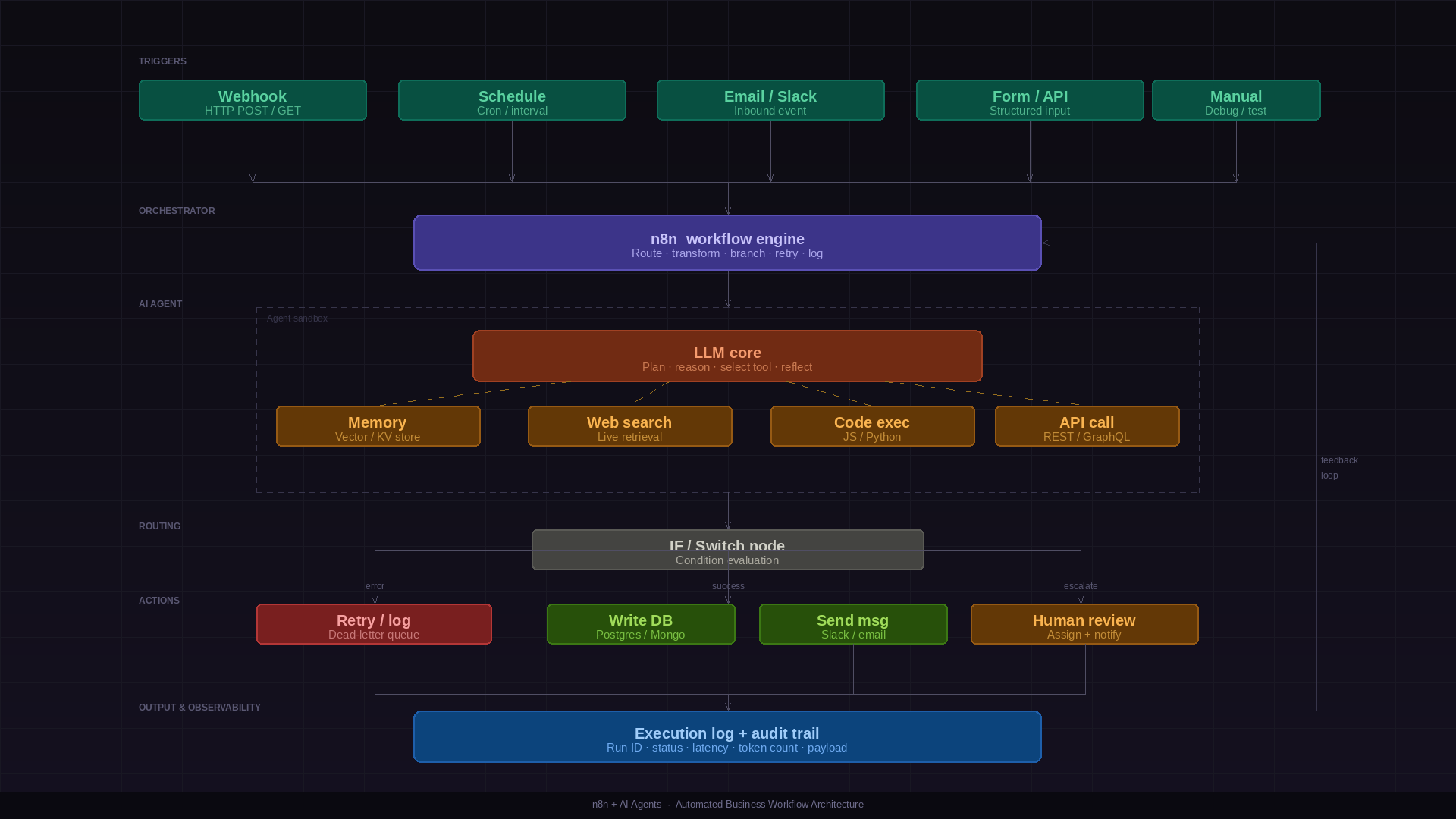
Document summarisation pipelines: A webhook receives a file URL → the HTTP node fetches the document → an AI node summarises it with a structured prompt → the output is written to a database and a Slack message is sent. End to end, under an hour to build.
AI triage and routing: Incoming support emails hit a webhook → an LLM node classifies intent and urgency using a defined schema → a Switch node routes to the appropriate queue. Confidence scores below a threshold route to a human review channel automatically.
RAG over internal data: n8n's vector store nodes connect to Pinecone, Qdrant, or Supabase pgvector. Build a retrieve-then-generate workflow entirely in the visual editor — embed documents on ingestion, retrieve relevant chunks at query time, pass to an LLM, return structured output.
Scheduled AI reporting: A cron trigger runs nightly → pulls data from your database → an LLM node writes a plain-English summary of anomalies and trends → the report lands in Slack or email before the team starts their day.
Scaling n8n in production: queue mode
The default n8n execution mode runs workflows in the main process. For production systems processing hundreds of concurrent workflows, this becomes a bottleneck — a single long-running workflow can block execution for everything else.
The answer is queue mode: n8n offloads workflow executions to a Redis-backed job queue, and separate worker processes pick them up independently. The main process handles only triggers and the UI; workers handle execution. You scale workers horizontally — add more containers as load increases, without touching the main instance.
🖥️ Main instance
Handles webhook reception, schedule triggers, the UI, and API calls. Enqueues jobs but does not execute them. Run one or two for availability.
⚙️ Worker instances
Pull jobs from the Redis queue and execute them. Stateless — scale up during high-load periods, scale down when idle.
🗄️ Redis
The job queue backbone. Stores pending executions, tracks in-progress jobs, and handles retries. A single Redis instance handles most production workloads.
🗃️ PostgreSQL
Workflow definitions, execution history, and credentials. Use Postgres in production — SQLite is not suitable for multi-instance deployments.
To enable queue mode, set
EXECUTIONS_MODE=queue
and configure
QUEUE_BULL_REDIS_HOST
in your environment. Workers start with
n8n worker
instead of
n8n start. The same Docker image runs both roles — the start command
determines which role the container takes.
Error handling and retry strategies
Production workflows fail. Third-party APIs go down, database connections time out, malformed payloads cause parse errors. How you handle these failures determines whether n8n is a reliable production system or a brittle automation that requires constant babysitting.
Node-level error handling: Every n8n node has an 'On Error' setting — Continue, Stop Workflow, or Retry on Fail. Use Retry on Fail for transient failures (HTTP requests, database operations) with exponential backoff configured.
Error workflows: Configure a global error workflow in n8n settings. This triggers whenever any workflow fails unhandled. Use it to send Slack alerts, create PagerDuty incidents, or write to a dead-letter table for manual review.
Idempotency: Design workflows to be safely re-runnable. If a workflow sends a webhook and then fails before writing to the database, re-running it shouldn't send the webhook twice. Use idempotency keys on external API calls and check-then-act patterns on database writes.
// Error workflow receives structured context:
{
  "execution": {
    "id": "abc123",
    "workflowName": "Invoice Processing",
    "error": { "message": "Connection timeout", "node": "Send to ERP" },
    "startedAt": "2026-03-22T09:15:00Z"
  }
}
Credentials and secrets management
n8n stores credentials encrypted in the database using a key
derived from
N8N_ENCRYPTION_KEY
in your environment. This key is critical — lose it and your
stored credentials are unrecoverable. Store it in your secrets
manager (AWS Secrets Manager, HashiCorp Vault), never in source
control.
For sensitive environments, consider external secrets with n8n's environment variable substitution. Rather than storing credentials in n8n at all, reference environment variables injected at runtime from your secrets manager. This keeps secret management centralised and auditable outside of n8n.
Monitoring and observability
n8n's built-in execution log is useful for debugging individual
workflows. It's not a production monitoring solution. For
production, expose n8n's metrics endpoint (N8N_METRICS=true) and scrape it with Prometheus. Build Grafana dashboards for
queue depth, error rate by workflow, and execution duration
histograms.
Set up alerts for: queue depth growing without bound (workers are down or overloaded), error rate above threshold for critical workflows, and execution duration spikes. For execution-level tracing, configure structured JSON logging and correlate n8n execution IDs with traces in your broader observability stack.
Self-hosting vs n8n Cloud
We default to self-hosting on our clients' infrastructure. The reasons: data sovereignty, no per-execution pricing surprises, and full control over the environment. n8n runs cleanly in Docker, and a single instance with queue mode handles the workflow volumes of most early-stage products.
n8n Cloud makes sense for teams that want zero infrastructure overhead and have no compliance constraints around data leaving their environment. The managed offering is solid — the trade-off is cost at scale and data residency.
What n8n is not good at
n8n is a workflow orchestrator, not a backend. High-throughput, low-latency operations don't belong here — if you're processing thousands of events per second, you need a proper event streaming architecture. Complex business logic with deep branching and state management is also better served by custom code. The visual editor becomes a liability at 40+ nodes.
The honest take
n8n has meaningfully changed how we architect operational systems for clients. Workflows that previously required a dedicated microservice can now be built, understood, and modified by someone who isn't a senior engineer.
That accessibility is the point. The best automation is the one your team can actually debug at 2am when something breaks — without paging the one engineer who built it six months ago.